Security Cameras
Wyze vs Ring vs eufy for Renters: Which Security Camera Is Worth It?

The RenterSmartHome Research Team, Research desk
Reviews analyzed 173,836 · 1 source
As an Amazon Associate we earn from qualifying purchases. Affiliate disclosure
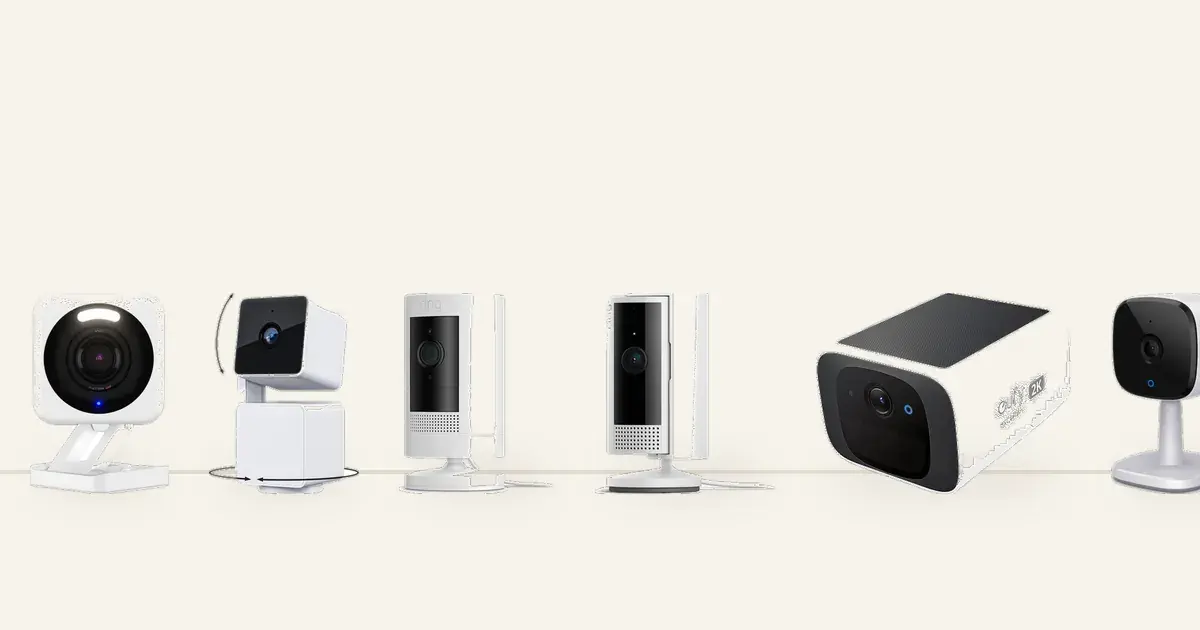
You rent your home, so every security camera choice comes with strings attached. The subscription costs money every month of your lease, the mount cannot put holes in the walls, and the camera has to leave with you when the lease ends. Wyze, Ring, and eufy are the three brands renters ask about most, and they solve these problems in very different ways. This guide compares all three on the only questions that matter to a renter: what it costs over a lease, whether it mounts without drilling, and whether the brand earned your trust.
Quick Answer: Our Verdict for Renters
Best overall for renters: eufy security cameras - no monthly fee, local storage on the device, and battery options for wire-free placement. Start with the eufy SoloCam S220 outdoors or the eufy Indoor Cam C120 indoors.
Best ultra-budget pick: Wyze cameras - the cheapest way to get sharp 2.5K video, with optional local storage. Try the Wyze Cam v4 at around $45.
Best app and ecosystem: Ring cameras - the most reliable notifications and the widest device lineup, if you accept the monthly plan for video history. See the Ring Indoor Cam 2nd Gen at around $50.
Who This Comparison Is For
This comparison is for renters who want a security camera without a permanent install or a surprise subscription bill. If your lease bans drilling, you live in an apartment or shared house, and you move every year or two, the brand you pick matters more than the model you pick, because the brands lock you into very different cost and storage models.
That includes apartment dwellers watching a front door or hallway, renters who want an indoor camera for a pet or a shared living room, and anyone who refuses to pay a monthly cloud fee. If you already pay for a Ring or Wyze plan and like it, the sections below confirm or challenge that choice with real two-year math.
The Renter Verdict Up Front
eufy is the best overall choice for most renters because it charges no monthly fee and stores video locally on the device, which keeps a 12-month lease cost equal to the purchase price. Wyze is the cheapest way in, with sharp video for around $38 to $45, but its value depends on how much you rely on cloud features. Ring has the most polished app and the most reliable alerts, but video history requires a paid plan, so it costs more over any lease length.
The split comes down to one decision: do you want to pay for storage every month, or own it once? Renters who move often and hate recurring fees lean eufy or Wyze with a memory card. Renters who already live inside the Alexa ecosystem and want the most dependable notifications often find Ring worth the plan.
Subscription and Storage Models Compared
Ring requires a paid cloud plan to save and rewatch recorded video; the camera shows live video for free, but video history sits behind the plan. eufy stores video on the device itself, with no monthly fee and no required account for basic recording. Wyze sits in between: local microSD storage works with no subscription, and the paid cloud plan is optional.
This is the renter wedge the other comparisons never quantify. A subscription is not a one-time cost; it multiplies across every month of your lease. The table below shows the two-year math using prices we saw in October 2026. Plan prices were not stated on the product pages we checked, so the Ring row shows the plan as a recurring cost without a dollar figure. Check the current plan price before you decide.
Brand | Local storage | Video history without a plan | 2-year total cost |
|---|---|---|---|
eufy | Yes, on-device (S220: 8GB built-in; C120: microSD slot) | Yes, full history on device | Device price only (around $50 to $70) |
Wyze | Yes, microSD up to 512GB | Yes, with a memory card | Device price only (around $38 to $45) |
Ring | No local option on the models below | No, requires a paid Ring plan | Device price (around $50 to $80) plus a monthly plan for 24 months |
Over a two-year stay, the no-fee brands cost you the sticker price. Ring's camera looks comparable at the register, but the plan keeps charging until you move out. If your lease is 12 months, that math favors eufy and Wyze; if you already subscribe to a Ring plan for a doorbell, adding a camera costs you nothing extra.
Renter-Friendly Hardware: No Wiring, No Drilling
All three brands sell plug-in or battery cameras that a renter can place on a shelf, a table, or a stand with zero drilling. Battery cameras like the Ring Stick Up Cam and the eufy SoloCam S220 go fully wire-free, which suits balconies and rooms far from outlets. Plug-in cameras like the Wyze Cam v4 and the Ring Indoor Cam need only a nearby outlet, so setup is a shelf and a plug.
The mounting difference that matters most is the eufy SoloCam S220: its stock mount uses one screw, so deposit-conscious renters should pair it with a third-party adhesive or magnetic mount instead. Every other camera in this guide sits on a flat surface or uses the included stand out of the box. If you are mounting on a wall or doorframe rather than a shelf, the no-drill mounting methods in our video doorbell install guide transfer directly: adhesive brackets, door-edge clamps, and peephole-style options work for cameras on the same rental surfaces. Indoor cameras deserve special attention for renters, because they avoid lease questions about exterior fixtures and sidestep neighbor privacy disputes in shared hallways.
Privacy and Trust Track Record
Camera brands handle your footage, so their privacy history matters more than their spec sheets. In 2023 and 2024, Wyze disclosed incidents in which some users briefly saw other users' camera thumbnails or event clips, which is why some independent reviewers stopped recommending Wyze cameras. In 2022, a security researcher reported that some eufy cameras uploaded thumbnails to cloud servers despite marketing that emphasized local-only storage; the resulting class-action lawsuit was later settled, and eufy has since revised its privacy claims. Ring's controversies center on law-enforcement footage requests, a policy question rather than a data leak.
None of this means the cameras are unsafe to buy today, but it explains the trust questions renters keep asking. If privacy is your top concern, keep firmware updated, enable two-factor authentication on your account, and use local storage so footage stays on the device.
App, Alerts, and Ecosystem
Ring's app earns the best marks for alert reliability and speed, and Ring devices talk to the widest smart-home lineup, especially Alexa. eufy's app runs locally with no cloud middleman, which keeps things simple but means fewer third-party integrations than Ring. Wyze's app covers the basics well at the lowest price, with a large budget ecosystem of sensors and plugs around it.
For a renter, alert reliability decides more days than any spec. A camera that pings your phone late is a camera you stop trusting. Ring leads here by most accounts; eufy is solid for local alerts; Wyze's connectivity complaints show up most in buyer reviews. If your household runs on Alexa, Ring's two-way talk and routines integrate the smoothest. If you want the fewest accounts and the least cloud involvement, eufy's local approach fits.
How We Picked These Cameras
We picked two current models per brand: one wire-free or outdoor-flexible camera and one indoor camera, all plug-in or battery with no wiring. Every model needed a strong buyer-review record (4.0 stars or more with hundreds of ratings) and a renter-feasible mounting path.
In total, we weighed 173,836 Amazon buyer ratings across the six finalists, then read the top-rated and most critical 1-star reviews for each model and cross-checked them against manufacturer specs and independent coverage.
Specifically, we looked at:
No-drill mounting path. Battery or plug-in cameras that sit on a shelf, table, or stand, or pair with an adhesive or magnetic mount. Screw-only installs did not make the list.
Subscription honesty. We state plainly which brands need a paid plan for video history, because the monthly fee is the biggest hidden cost in this category.
Review evidence. We read Amazon top-rated and 1-star reviews plus manufacturer specs. We did not lab-test these units.
Current models only. Discontinued cameras and models with thin review records were excluded; see the excluded candidates note at the end of the guide.
Prices change often; treat figures below as what we saw in October 2026 and check the current price before you buy.
The 6 Cameras: Quick Comparison
For most renters, a eufy camera is the best Wyze-vs-Ring-vs-eufy answer: no monthly fee and local storage keep the lease cost flat. Wyze wins on entry price, and Ring wins on app polish if you accept the plan. The table compares all six on what renters need.
Camera | Type | Power | Local storage, no monthly fee | Monthly plan needed for video history |
|---|---|---|---|---|
Wyze Cam v4 | Indoor/outdoor | Plug-in USB | Yes (microSD up to 512GB) | No (cloud plan optional) |
Wyze Cam Pan v3 | Indoor/outdoor pan/tilt | Plug-in USB | Yes (microSD up to 512GB) | No (cloud plan optional) |
Ring Outdoor Cam (Stick Up Cam) | Outdoor/balcony | Battery | No | Yes |
Ring Indoor Cam (2nd Gen) | Indoor | Plug-in USB | No | Yes |
eufy SoloCam S220 | Outdoor/balcony | Battery + solar | Yes (8GB on-device) | No |
eufy Indoor Cam C120 | Indoor | Plug-in USB | Yes (microSD) | No |
How we picked
This guide does not yet record how the picks were chosen.
In-Depth Reviews
Below are the six cameras worth considering as a renter in 2026, ordered by renter fit. Each review draws on Amazon buyer reviews and manufacturer specs.
1. WYZE Cam v4, 2.5K AI Security Camera - Best Ultra-Budget Pick for Renters
Best for: Renters who want the sharpest picture for the least money and are comfortable with a memory card instead of a cloud plan.
The Wyze Cam v4 is the price floor of this comparison, and it does not look like one. Reviewers praise the 2.5K QHD picture day and night, with color night vision that holds up in dim rooms. Setup is easy, the magnetic mount snaps the camera onto any metal surface, and it sits happily on a shelf with the plug-in USB adapter. No wiring, no drilling.
The renter economics are the story. Wyze's page states that 512GB of local storage works with no subscription required, so a cheap microSD card gives you weeks of footage for the purchase price alone. The optional Wyze Cam Plus cloud plan exists for renters who want cloud clips, but nothing in this review needs it.
The complaints are real. Connectivity is the top negative theme in buyer sentiment, with hundreds of mentions, and subscription complaints cluster around paywalled features. Reliability reports are mixed. But at 4.3 stars across 11,427 ratings, most owners feel they got far more than $44.97 of camera. We saw it around $45. Check the current price on Amazon.
2. WYZE Cam Pan v3, 360-Degree Pan/Tilt/Zoom - Best for Whole-Room Coverage
Best for: Renters who want one camera to cover an entire living room or studio instead of buying two fixed cameras.
The Wyze Cam Pan v3 watches a whole room by itself. The 360-degree pan with motion tracking and auto patrol follows movement, so one camera on a bookshelf can replace a pair of fixed cameras in a studio or open living room. Picture quality is clear, night vision is color, and a physical privacy mode rotates the lens away when you are home. It is IP65 rated, so it survives under eaves if your rental has a covered entry.
Like the v4, it records to a microSD card with no subscription needed, and the cloud plan stays optional. That keeps the two-year cost at the sticker price: we saw $37.98, the cheapest camera in this guide.
Connectivity is the loudest complaint here, with a thousand negative mentions, and reliability reports are mixed. Motion detection earns mixed ratings too. But for whole-room coverage on a renter's budget, nothing else pans for this price. At 4.3 stars across 33,373 ratings, the value case is well tested by other buyers. Check the current price on Amazon.
3. Ring Outdoor Cam (Stick Up Cam), Battery - Best for Wire-Free Balconies
Best for: Renters with a balcony, patio, or private entry who want a weather-resistant camera with zero wiring.
The Ring Stick Up Cam is the wire-free workhorse of this guide. The rechargeable battery means no outlet hunt, and the weather-resistant body suits balconies and covered patios. Reviewers report clear day-and-night video, easy setup, two-way talk, and strong Alexa integration. It sits on a flat surface or mounts with the included hardware, so the renter path is a shelf or a third-party adhesive mount.
The renter catch is the subscription. Ring's page is explicit: saving and rewatching recorded video requires a compatible Ring plan, with up to 180 days of history. Live view works without a plan, but a camera that cannot show you what happened last night is half a camera. Price the plan into your lease before you buy.
Battery life varies with usage, and connectivity hiccups show up in buyer sentiment. At 4.5 stars across 65,637 ratings, it is the most reviewed camera here, and we saw it at $79.99. Check the current price on Amazon.
4. Ring Indoor Cam (2nd Gen), 1080p HD - Best for Alexa Households
Best for: Renters who want a simple indoor camera with the most reliable app alerts, especially in Alexa homes.
The Ring Indoor Cam 2nd Gen is the cheapest Ring entry point, and reviewers rate it the highest of this group: 4.7 stars with 85 percent 5-star ratings across 46,389 reviews. The 1080p wide-angle view covers a room, color night vision handles dark apartments, and the manual privacy cover physically blocks the lens. It plugs in with a 6.5-foot Micro USB adapter and sits on a table: zero drilling.
The subscription math from the section above applies unchanged: video event history needs a Ring plan, so this $49.99 camera costs more than the sticker over a lease. Buyers who already pay for a Ring doorbell plan feel this least, since the plan covers all Ring devices.
Connectivity and reliability complaints exist but run quieter than the Wyze models. If alerts you can trust matter more than monthly cost, this is the pick. We saw it around $50. Check the current price on Amazon.
5. eufy Security SoloCam S220, Solar Wireless 2K - Best Overall for Renters
Best for: Renters who want outdoor coverage with zero monthly fee and never want to think about charging.
The eufy SoloCam S220 is our best overall pick for renters because it removes both renter pain points at once. The built-in solar panel keeps the battery topped up, so charging anxiety disappears, and the on-device 8GB storage records with no monthly fee, ever. eufy's page states it plainly: one-time purchase, no monthly fees or hidden costs. The 2K resolution and wire-free design make it the easiest outdoor camera to live with in a rental.
The one renter caveat: the stock mount uses one screw, and the page says "drill one hole, once." Deposit-conscious renters should skip the stock mount and use a third-party adhesive or magnetic mount instead. With that swap, the install is fully damage-free.
Durability and reliability earn mixed reports in buyer sentiment, and motion detection is mixed too. But 4.2 stars across 6,720 ratings is a solid record for a no-fee camera, and we saw it at $69.99 (30 percent off a $99.99 list). Check the current price on Amazon.
6. eufy Security Indoor Cam C120, 2K Plug-In - Best Indoor Pick for Renters
Best for: Renters who want an indoor camera for a pet, a nursery check-in, or a shared living room, with no monthly fee.
The eufy Indoor Cam C120 brings the no-fee model indoors. A microSD card stores 2K footage locally with no monthly plan, and the camera sits on a shelf with a USB plug: zero drilling, zero wiring. Reviewers praise the day and night picture quality, human and pet detection, and strong value. Power users get RTSP and NAS support, a rarity at this price.
One practical note from the listing: delivery ran longer than the other cameras we checked (October 31 to November 13 at the time of research), so order early if you need it by a move-in date. The screw-pack bracket in the box is optional; the camera sits on a shelf fine.
Reliability is the most-discussed mixed aspect in buyer sentiment, and night vision and motion detection earn mixed marks. Still, 4.3 stars across 10,290 ratings is a strong record, and we saw it at $49.99. Check the current price on Amazon.
Which Brand for Which Renter
Pick by scenario, not by spec sheet. The no-subscription renter should buy eufy: the SoloCam S220 outdoors or the Indoor Cam C120 indoors, both with local storage and no monthly fee. The cheapest renter should buy Wyze: the Cam v4 at around $45 or the Pan v3 at around $38, with a microSD card instead of a cloud plan. The Alexa-home renter who values alert reliability should buy Ring: the Indoor Cam 2nd Gen or the Stick Up Cam, accepting the plan as the price of the best app. The dog owner checking in from work should buy an indoor plug-in camera from any brand, since battery cameras sleep between events and can miss quick pet moments.
Match the camera to your constraints first. A balcony with no outlet needs a battery camera. A lease with strict exterior rules needs an indoor camera. A tight budget needs the cheapest sticker with no plan. The table above and the reviews make that match in one pass.
Installation Tips for Renters
Place indoor cameras on a high shelf with a clear view of the room, keep them away from windows to avoid glare, and test the Wi-Fi signal at the spot before you commit. For battery cameras on a balcony, angle the lens to cover your door and packages, not the neighbor's windows.
A few more renter-specific tips:
Start with indoor cameras. They raise no lease questions about exterior fixtures and avoid neighbor privacy disputes in shared hallways.
Use privacy zones. Black out a neighbor's doorway or window in the app so your camera never records where it should not.
Charge batteries fully before mounting. You do not want to take the camera down on day two because it arrived half-charged.
Buy the memory card with a Wyze camera. Local storage is the whole value proposition; without a card, you lean on the optional cloud plan.
For the eufy S220, skip the stock screw mount. A third-party adhesive or magnetic mount keeps the install deposit-safe.
For more on damage-free mounting, see our guide to the best no-drill video doorbells for renters.
Removal and Deposit Safety
Removal is the easy part of this category. Unplug the camera, lift it off the shelf, and take the mount down. If you used a third-party adhesive mount for the eufy S220, warm it with a hair dryer and peel slowly, then clean residue with rubbing alcohol. Nothing in this guide drills a hole when installed the renter way.
Before your move-out inspection, photograph every spot where a camera sat, and keep the original mounts and packaging in a labeled box from day one. The whole point of a renter camera is that it leaves with you, so a five-minute takedown is the final test it was built to pass. Our no-drill install and removal workflow for renters walks through the same adhesive, clamp, and residue-cleanup steps in about 15 minutes.
Final Verdict
For most renters, eufy is the best answer in the Wyze vs Ring vs eufy debate: no monthly fee, local storage, and battery options that mount without drilling. Wyze is the right call if every dollar counts and you are comfortable with a memory card. Ring is worth the plan if you want the most dependable alerts and already live in the Alexa ecosystem. Whichever brand you choose, mount it without holes, skip the cloud bill if your lease is short, and compare it against our renter-friendly smart lock picks for a full no-drill entryway.
Sources
Everything below was accessed on October 10, 2026.
Amazon product pages for all six models: buyer ratings and review themes from top-rated and critical 1-star reviews, 173,836 combined buyer ratings weighed (WYZE Cam v4, WYZE Cam Pan v3, Ring Outdoor Cam Stick Up Cam, Ring Indoor Cam 2nd Gen, eufy Security SoloCam S220, eufy Security Indoor Cam C120).
Manufacturer spec pages (Wyze, Ring, eufy/Anker): local storage claims, subscription requirements, and mounting details.
Independent coverage: TechGearLab (home security camera rankings), U.S. News Real Estate (Wyze vs Ring Alarm), Sipko Security and HomeGuide (Ring vs eufy comparisons), and community discussion (Reddit r/wyzecam, RedFlagDeals doorbell thread) for renter sentiment.
Common questions
Which camera is better, Ring, eufy, or Wyze?
It depends on your constraint. eufy is best if you refuse a monthly fee, since storage is local and free. Wyze is best if you want the lowest sticker price with sharp video. Ring is best if you want the most reliable app alerts and the widest smart-home support, and you accept the paid plan for video history.
Is eufy better than Wyze?
For subscription-free use, yes. eufy stores video on the device with no monthly fee by default, while Wyze's best no-fee setup needs a microSD card you buy separately. Wyze wins on entry price: the Cam Pan v3 costs less than $40.
Why do we no longer recommend Wyze cameras?
Some independent reviewers stopped recommending Wyze after the company disclosed incidents in 2023 and 2024 in which some users briefly saw other users' camera thumbnails or event clips. Wyze has addressed the incidents. Keep firmware current and enable two-factor authentication.
What is the lawsuit against eufy?
In 2022, a security researcher reported that some eufy cameras uploaded thumbnails to cloud servers despite marketing that emphasized local-only storage. A class-action lawsuit followed and was later settled, and eufy has since revised its privacy claims.
Do I need a subscription for a security camera as a renter?
Not necessarily. eufy cameras and Wyze cameras with a microSD card record with no monthly fee. Ring cameras need a paid plan for video history, though live view works without one. Over a 12-month lease, the no-fee options cost only the purchase price.
Sources
This guide uses AI-assisted analysis of buyer reviews, manufacturer specifications, and public sources on Reddit, YouTube, and expert sites. A person reviews every guide before it is published. We do not test these tools hands-on. As an Amazon Associate we earn from qualifying purchases. Affiliate disclosure · How we research